Service section
Overview
The services experience follows a three-step discovery funnel: a homepage teaser section surfaces top expeditions, a full listing page shows all services in a grid, and an individual service detail page presents the complete expedition profile. Each step is driven by a service_details metaobject, ensuring content is managed in one place and reflected everywhere automatically.
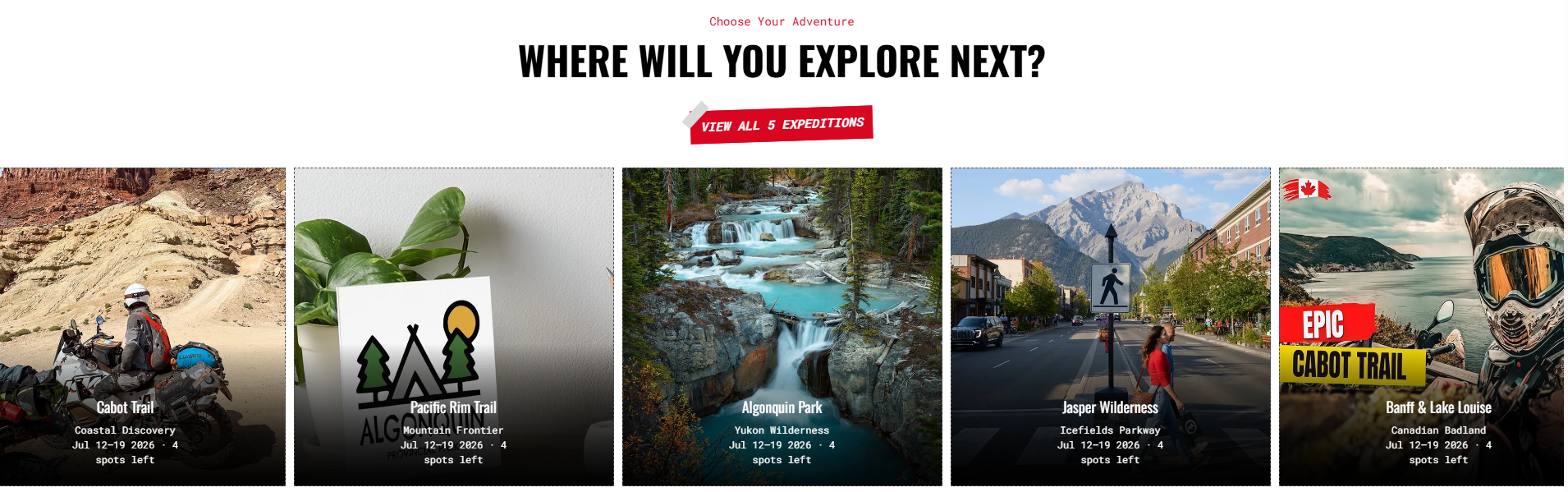
Step 1 — Homepage Teaser (services_grid section)
What the visitor sees:
A section header with tagline, bold heading, and a prominent CTA button sits above a horizontal row of five image cards. Each card shows the expedition photo, name, category subtitle, upcoming date, and spots remaining — overlaid on a dark red gradient at the card bottom.
Purpose: Quick discovery. The visitor scans available expeditions at a glance without leaving the homepage.
CTA: The "VIEW ALL 5 EXPEDITIONS" button links to the full services listing page.
How it's managed:
Each card in the services_grid section is an Image block linked to a service_details metaobject. The image, title, date, and spots data all pull from the metaobject — editors add or update expeditions in the metaobject list, not directly in the section.
| What you see on screen | Where it comes from |
|---|---|
| Tagline ("Choose Your Adventure") | services_grid section setting |
| Heading ("WHERE WILL YOU EXPLORE NEXT?") | services_grid section setting |
| Button label and link | services_grid section setting |
| Card image | Image block (custom image or metaobject image) |
| Card name, category, date, spots | service_details metaobject |
| Red gradient overlay | Blend overlay setting per block |
Step 2 — Full Services Listing (page.services template)
What the visitor sees:
After clicking the homepage CTA, the visitor lands on a dedicated services page. The page body content (from the Shopify page object) appears at the top, followed by the complete grid of all service cards — three across on the top row, two on the bottom for five total. Each card now shows a longer description excerpt alongside the name, giving more context for comparison.
Purpose: Consideration. The visitor evaluates all expeditions side by side before choosing one to explore in depth.
How it's managed:
This page uses the page.services template, which combines the standard main_page section (renders the page title and body) with a second services_grid section. The grid defaults to 3 desktop columns and 1 mobile column in this template. Editors manage card content through the same metaobject blocks as the homepage section.
| What you see on screen | Where it comes from |
|---|---|
| Page heading | Shopify page title |
| Page body text | Shopify page rich text content |
| Card grid layout | services_grid section (3 col desktop, 1 col mobile) |
| Card name and description excerpt | service_details metaobject |
| Red gradient overlay | Blend overlay setting per block |
Step 3 — Individual Service Detail (main_service template)
What the visitor sees:
Clicking any card opens the full expedition page. A breadcrumb trail at the top shows the navigation path. The left half of the hero area displays all expedition data: country flag and region, departure date and time, available spots, the expedition title, a full description, a stats row (duration, total distance, skill level, group size), and a "RESERVE YOUR SPOT" button. The right half fills the viewport with the expedition's hero image overlaid with the brand red gradient.
Below the hero, the page continues with the metaobject's structured content — schedule, packages, checklist, providers, and reviews — followed by the inquiry form.
Purpose: Decision and conversion. The visitor gets the full expedition brief and a clear path to reserve their spot or submit an inquiry.
How it's managed:
All data on this page is read directly from the service_details metaobject attached to the current URL. Editors update expedition details (dates, spots, description, stats, schedule, packages, etc.) in the metaobject — no theme editor changes are needed for content updates. The inquiry form options (countries, departure dates, experience levels, group sizes) are configured in the main_service section settings.
| What you see on screen | Where it comes from |
|---|---|
| Breadcrumb trail | Static breadcrumbs block (main_service template) |
| Flag, region, date, spots | service_details metaobject fields |
| Expedition title | service_details metaobject |
| Description | service_details metaobject |
| Stats row (days, km, skill, group size) | service_details metaobject |
| "RESERVE YOUR SPOT" button | main_service section setting (button label) |
| Hero image | service_details metaobject |
| Schedule, packages, checklist, providers, reviews | service_details metaobject (via ordered blocks) |
| Inquiry form dropdown options | main_service section settings |